
template.md 7.6 KB
marp: true
Marp
Markdown 演示生态系统
by Marp 团队 (@marp-team)
特点
- :memo: 使用普通的 Markdown 编写投影片 (CommonMark)
- :factory: 基于 Marpit framework: 一个全新的轻量级框架,用于创建投影片
- :gear: Marp Core: 通过 npm 轻松启动核心引擎并使用内置主题
- :tv: Marp CLI: 将 Markdown 转换为 HTML、 PDF、 PPTX、 和图像
- :vs: Marp for VS Code: 在编辑时实时预览您的投影片
- 等等...
如何编写幻灯片?
通过水平标尺拆分页面 (e.g. ---)。 这很简单。
# 幻灯片 1

张三李四

---

# 幻灯片 2

张三李四
Directives
Marp 引入了名为 "Directives" 的扩展语法,以支持创建漂亮的幻灯片。
在 Markdown 正文之前插入:
---
theme: default
---
或者在正文的任意位置使用 HTML 进行描述:
<!-- theme: default -->
https://marpit.marp.app/directives
全球 directives
theme: 选择主题size: 选择幻灯片尺寸为16:9或4:3(不包括 Marpit framework)headingDivider: 在任意标题之前插入幻灯片的分页符--- theme: gaia size: 4:3 --- # Content
Marp 中有以下 built-in themes in Marp Core 可供使用 :
default,gaia, anduncover.
局部 directives
每个幻灯片页面可设置的值列表
paginate: 使用true显示页数header: 指定页眉内容footer: 指定页脚内容class: 为当前幻灯片设置 HTML 类color: 指定文字颜色backgroundColor: 指定背景颜色
点 directives
局部 directives 将应用于 defined page and following pages.
通过使用下划线和前缀,例如 _class ,可以将其应用于单个页面。
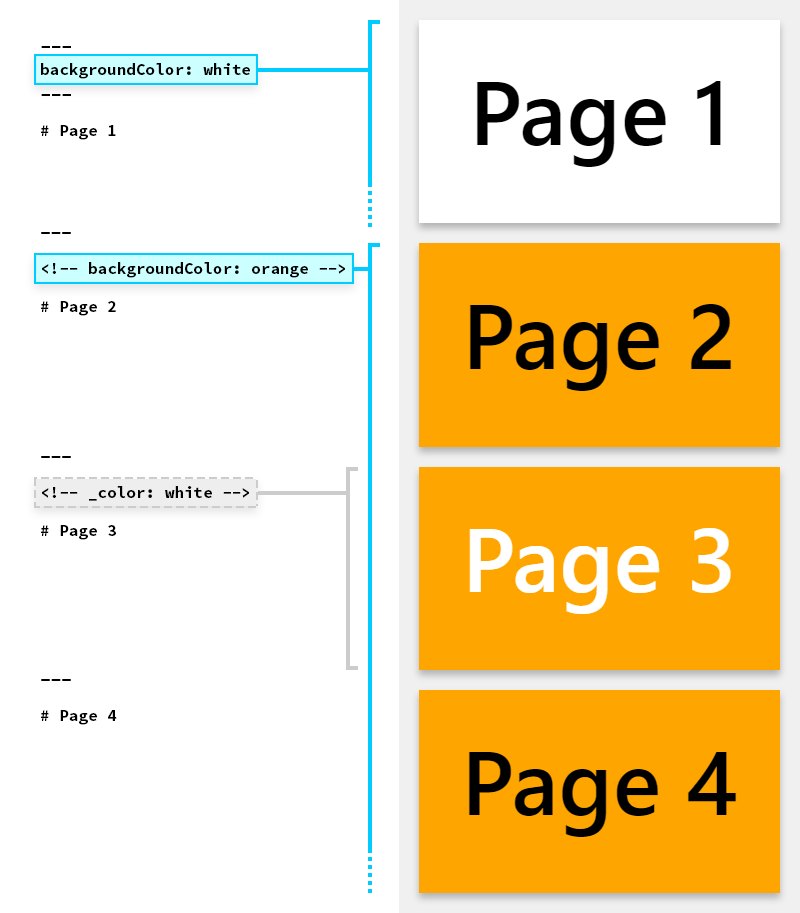
例子
该页面使用了反转色彩方案 defined in Marp built-in theme。
<!-- _class: invert -->
图像标记语言的语法
您可以通过关键词调整图像大小并应用过滤器 : width (w), height (h), 和滤镜CSS关键词


请指定 resizing image syntax 和 a list of CSS filters。

背景图像的语法
您可以使用 bg 关键字为幻灯片设置背景图像。


利用多个背景图像 (Marpit's advanced backgrounds)
Marp 可以使用多个背景图像。



还可以通过包含 vertical 关键字来更改对齐方向。
分割背景
Marp 可以使用 Deckset 风格的分割背景。
通过 bg + left / right 关键字为背景留出空间。


分段列表
Marp 将列表与星号标记解析为分段列表,以逐一显示内容。 (仅适用于导出的 HTML by Marp CLI / Marp for VS Code)
# 项目符号列表

- 一
- 二
- 三

---

# 分段列表

* 一
* 二
* 三
数学排版 (仅适用于 Marp Core)
使用 KaTeX 进行数学排版,例如 $ax^2+bc+c$ 可以与 Pandoc's math syntax 一起使用。
$$I_{xx}=\int\int_Ry^2f(x,y)\cdot{}dydx$$
$ax^2+bc+c$
$$I_{xx}=\int\int_Ry^2f(x,y)\cdot{}dydx$$
自动缩放 (仅适用于 Marp Core)
Several built-in themes 支持对代码块和数学排版进行自动缩放。
Too long code block will be scaled-down automatically. ------------>
Too long code block will be scaled-down automatically. ------------------------>
Too long code block will be scaled-down automatically. ------------------------------------------------>
自动调整标题 (仅适用于 Marp Core)
在标题中注释 <!--fit--> 即可使用。
## <!--fit--> Auto-fitting header (only for Marp Core)
主题样式表
Marp 使用 <section> 作为每个幻灯片的容器。 其他的样式与普通的 Markdown 样式相同。定制主题可在 Marp CLI 和 Marp for VS Code 中使用。
/* @theme your-theme */

@import 'default';

section {
  /* Specify slide size */
  width: 960px;
  height: 720px;
}

h1 {
  font-size: 30px;
  color: #c33;
}
在 Markdown 中微调样式
Markdown 中的 <style> 标签将在主题 CSS 的上下文中起作用。
---
theme: default
---

<style>
section {
  background: yellow;
}
</style>

Re-painted yellow background, ha-ha.
您还可以通过类别添加自定义样式,例如
section.custom-class { ... }。 通过<!-- _class: custom-class -->应用样式。
局部样式
如果您想为当前页面设置一次性样式,可以使用 <style scoped> 。
<style scoped>
a {
color: green;
}
</style>
